

QuickBooks Bill Pay Pricing, Fees and Plans
Oct 15, 2026
QuickBooks Bill Pay pricing: base plan $0, Premium $15, Elite $45 a month. Standard ACH free, checks $1.50, faster ACH $10. Real monthly totals for three setups.
Read moreAccounts Payable AI Agent
Submit invoices, receipts, and bills. Receive organized data for Excel, CSV, or your accounting platform.
Upload your invoices and receipts
Drop files here or click to upload
PDF, JPG, PNG, BMP, HEIC, TIFF
Uploading...
| Vendor | Description | Qty | Unit | Total |
|---|---|---|---|---|
| Office Supplies Co. | Printer Paper (Case) | 10 | 45.99 | 459.90 |
| Office Supplies Co. | Ink Cartridges | 4 | 32.50 | 130.00 |
| Subtotal 589.90 · Tax 51.62 | 641.52 | |||
Our invoice OCR software reads your documents and pulls out vendor names, invoice numbers, dates, line items, taxes, and totals. You receive clean data ready for your accounting platform in seconds, not hours.
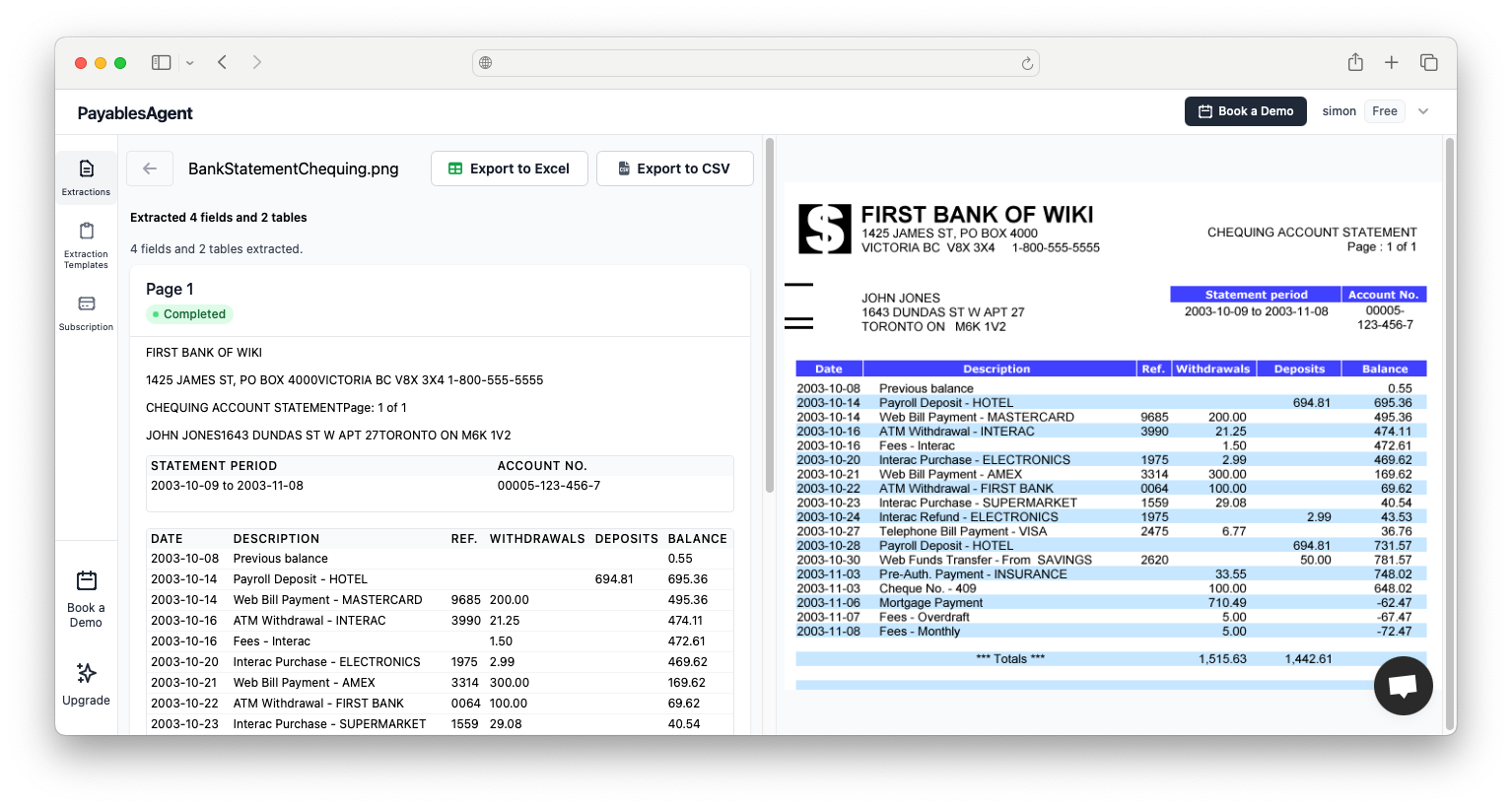
Drop in a batch of invoices. Get accurate, organized data back in seconds. Export to Excel, CSV, or connect directly with QuickBooks.
Software that reads invoices, receipts, and bills for you, so nobody has to key the data in by hand.

Add invoices, receipts, or bills in any format: PDF, photo or scan. No configuration or templates needed.
Our AI detects vendor names, invoice numbers, dates, line items, taxes, and totals, grasping context rather than just recognizing characters.
Receive validated, organized data ready for Excel, CSV, QuickBooks, or your accounting software within seconds.
Traditional OCR tools demand a template per vendor. Our AI recognizes layouts on its own, for any supplier and any format.
Knows that a figure beside "Total" differs from an invoice number. Reliable even on low-quality scans or mobile photos.
Totals are cross-checked, dates verified, and required fields confirmed. Problems are highlighted so your data is always trustworthy.
PayablesAgent provides the precision, speed, and dependability that accounting teams need to modernize their invoice workflows.
Tasks that once took your team hours now wrap up in minutes. Our invoice OCR processes documents concurrently, handling hundreds of invoices while you direct your focus to higher-value activities. Batch upload entire folders and let AI take over the data entry.
Our AI models are purpose-built for financial documents. They interpret invoice structures, recognize typical field patterns, and extract data with outstanding precision. Integrated validation catches mistakes before they reach your ledger.
No need to configure templates for every supplier. Our smart invoice OCR adjusts automatically to any document layout. New vendors, overseas invoices, non-standard formats, our AI manages them all without prior setup.
Send extracted invoice data to Excel (.xlsx), CSV, JSON, or push it directly into QuickBooks Online. Output arrives clean and organized, ready to drop into any accounting system without extra reformatting.
Our invoice OCR reaches beyond header fields. We capture full line item detail including descriptions, quantities, unit prices, and row totals. Get the complete picture from every invoice for precise cost allocation and spend analysis.
Your financial documents need robust protection. We apply 256-bit encryption to all transfers and stored files. Isolated accounts, access logging, and full deletion controls keep your sensitive invoice data protected.
Three straightforward steps to convert paper invoices into organized digital records
Drag and drop invoices, receipts, or bills into PayablesAgent. We accept PDFs and images (JPG, PNG, HEIC, TIFF). Upload a single document or hundreds at a time, our batch processing scales to any volume.
Our invoice OCR engine examines each document, determines its layout, and pulls out all relevant information. Machine learning models locate supplier details, amounts, dates, line items, and tax figures automatically.
Check the extracted data (make corrections if needed), then send it to your preferred format. Download Excel or CSV files, or push data straight into QuickBooks. Structured output imports cleanly into any accounting system.
From supplier invoices to employee receipts, our AI covers all your financial document extraction requirements
AP invoices from any supplier, any layout. Pull supplier info, invoice details, line items, and payment terms.
Expense receipts, retail slips, restaurant checks. Capture merchant, date, purchased items, tax, and totals.
Utility bills, recurring service charges, vendor statements. Extract account numbers, billing periods, and amounts due.
PO documents for three-way matching. Extract PO numbers, ordered quantities, unit prices, and supplier details.
Our invoice OCR technology adapts to documents from any origin. Whether invoices arrive by email, you scan paper originals, or photograph receipts on your phone, PayablesAgent pulls out the data reliably.
JPG / PNG
HEIC
TIFF
From independent businesses to large accounting departments, our invoice OCR software fits your sector's requirements
Handle client invoices and receipts with greater efficiency. Our invoice OCR helps accountants navigate document-heavy periods like tax season and month-end close without getting bogged down in data entry. Process documents from multiple clients in bulk while keeping outputs separate and organized.
Construction businesses juggle invoices from dozens of suppliers, subcontractors, and material distributors. Our invoice OCR captures job numbers, PO references, and detailed line items to support project cost tracking and billing requirements.
Property managers deal with maintenance invoices, utility statements, and vendor payments across multiple sites. Our invoice OCR pulls property addresses, unit numbers, and expense categories to ease cost allocation and owner reporting.
Retail operations manage high volumes of supplier invoices and shipping receipts. Our invoice OCR captures SKUs, quantities, unit costs, and freight charges to support inventory management and margin tracking.
Food service businesses receive daily invoices from multiple distributors. Our invoice OCR processes produce invoices, beverage orders, and supply deliveries, extracting item-level data for food cost analysis and stock management.
Transport companies handle fuel receipts, maintenance invoices, and carrier bills every day. Our invoice OCR pulls vehicle IDs, mileage figures, and cost breakdowns to support fleet management and per-mile cost analysis.
PayablesAgent captures every data field you need for full accounts payable automation. Our AI identifies and extracts information precisely, regardless of how a document is laid out or formatted.
Vendor name, address, phone, email, tax ID. Invoice number, date, due date, PO reference. Customer billing and shipping addresses.
Item descriptions, SKUs or part numbers, quantities, unit prices, line totals. We capture complete row-by-row detail for accurate cost allocation.
Subtotals, tax amounts (with tax type identification), freight charges, discounts, and grand totals. Our validation confirms that extracted figures add up correctly.
Payment terms (Net 30, 2/10 Net 30, etc.), bank details for wire transfers, remittance addresses, and early payment discount terms.
{
"vendor": {
"name":"Office Supplies Co.",
"address":"123 Main Street",
"city":"New York",
"state":"NY",
"zip":"10001"
 },
"invoice": {
"number":"INV-2024-0892",
"date":"2024-01-15",
"due_date":"2024-02-14",
"po_number":"PO-5521"
 },
"line_items": [
 {
"description":"Printer Paper (Case)",
"quantity": 10,
"unit_price": 45.99,
"total": 459.90
 },
 {
"description":"Ink Cartridges",
"quantity": 4,
"unit_price": 32.50,
"total": 130.00
 }
 ],
"subtotal": 589.90,
"tax": 51.62,
"total": 641.52
}
Extracted data is structured and ready to import into any accounting system or database.
Invoice data holds sensitive business information. We safeguard it using the same security standards applied by financial institutions.
Every data transfer and stored document is secured with AES-256 encryption, the same standard relied on by banks and government agencies.
Our servers operate in data centers with around-the-clock monitoring, redundant systems, and routine security audits.
Your documents are kept entirely separate from other users. Access controls ensure only authorized team members can view your information.
When you remove a document it leaves your account, and when you cancel you can ask us to erase your stored documents and files for good. You decide your data's lifecycle.
A direct comparison between automated invoice OCR and conventional manual invoice processing
| Factor | Manual Entry | PayablesAgent |
|---|---|---|
| Processing time per invoice | 3-5 minutes | Under 30 seconds |
| Data entry errors | 2-5% error rate | Totals checked against line items |
| Batch processing | One at a time | Hundreds in parallel |
| New vendor setup | No special handling | No templates needed |
| Cost per invoice | $3-8 labor cost | Pennies per page |
| Scalability | Hire more staff | Instant scale up |
Everything you need to know about our invoice OCR software and how it can benefit your organization
Invoice OCR (Optical Character Recognition) is technology that automatically reads text from invoice images and PDFs. Our advanced AI surpasses basic OCR by comprehending document structure to identify and extract specific data fields like vendor names, amounts, dates, and line items. The outcome is organized data ready for your accounting systems.
We support PDF documents (both native and scanned), JPG, PNG, HEIC, TIFF, and BMP images. Whether your invoices arrive as email attachments, scanned documents, or phone snapshots, our invoice OCR handles them reliably. Maximum file size is 50MB per document.
Our invoice OCR reaches over 99% accuracy on clearly legible documents. We use AI models developed specifically for financial documents, and our validation system catches likely errors. For best results, ensure documents are reasonably clear. You can always review and adjust extracted data before exporting.
No. Unlike older OCR tools that require manual template setup, PayablesAgent uses intelligent AI that adjusts automatically to any invoice format. Upload invoices from new vendors with zero configuration, our system figures out the layout on its own and extracts data accurately from the very first document.
Yes, batch processing is a core capability. Drag and drop dozens or hundreds of invoices at one time. They run concurrently, so a batch of 100 invoices completes almost as quickly as one. This makes end-of-month runs and backlog clearing dramatically more efficient.
Export extracted invoice data to Excel (.xlsx), CSV, or JSON format. We also offer direct integration with QuickBooks Online. The exported data is clean and structured, ready to import into your accounting software, ERP, or database without additional reformatting.
Absolutely. We use 256-bit encryption for all data transfers and at-rest storage. Your documents are isolated in secure accounts with access logging for audit trails. You can remove your documents from your account at any time, and when you cancel you can ask us to erase your stored documents and files for good.
Yes. Our invoice OCR handles documents in multiple languages and recognizes a wide range of international invoice formats. We support different date conventions, currency symbols, tax structures (VAT, GST, etc.), and address formats used globally.
Yes, line item extraction is fully supported. Our invoice OCR pulls item descriptions, quantities, unit prices, and line totals from invoice tables. This detailed extraction supports accurate cost allocation, stock management, and three-way matching workflows.
Standard OCR simply converts image text into digital characters. AI invoice processing (what PayablesAgent delivers) interprets document meaning, it knows which fields to locate, where they commonly appear, and how to verify extracted data. This produces higher accuracy without any template configuration.
Most AP platforms charge per user or quote every deal. PayablesAgent is flat: Starter $49 a month, Plus $149 a month for up to 3 seats, with line items included.
Bill.com competitors
BILL lists $49 to $89 per user per month. See how Ramp, Melio, Tipalti, Stampli and capture-only tools price the same job.
Melio competitors
Melio runs $0 to $80 a month plus $10 per extra user on Core and Boost. Where it wins, and where invoice capture is the better buy.
Dext alternative
Dext charges extra for line item extraction. Compare the add-on math with a plan where line items are included.
Stampli competitors
Stampli publishes no prices and quotes by entity and vendor count. Benchmark the quote against published plans.
Shortlisting tools this week? Our best OCR software for invoice processing roundup prices nine tools from their own pricing pages. Still opening paper bills? Compare accounts payable scanning solutions for scanned vendor invoices. Paying the bills from QuickBooks or Melio? See how capture fits next to them in our guide to accounts payable software for small business.
Begin extracting data from invoices in minutes. No technical configuration required.
Deploying invoice OCR software does not demand IT resources or drawn-out implementation projects. PayablesAgent is a cloud-based platform that runs entirely in your web browser. Create an account, upload your first invoice, and view extracted data in seconds.
If you are a bookkeeper, independent accountant, or small business owner handling invoices on your own, getting started is straightforward. Upload invoices from your computer or phone. Export extracted data to Excel for your records or bring it into QuickBooks. A one-time demo lets you test it on your actual documents before you pick a plan.
Accounts payable teams can adopt PayablesAgent alongside their existing workflows. Route invoice emails to team members, have them upload batches to PayablesAgent, and send structured data to your ERP or accounting platform. Our API is available for teams that want to build automated connections.
Accounting practices can use PayablesAgent to handle invoices across client accounts with efficiency. Batch upload documents, extract data, and export to client-specific formats. The time savings compound across your entire client roster, turning document processing into a profitable service rather than an overhead cost.
No credit card required. Process your first invoices in minutes.
Tips, guides, and best practices for invoice OCR and AP automation
Oct 15, 2026
QuickBooks Bill Pay pricing: base plan $0, Premium $15, Elite $45 a month. Standard ACH free, checks $1.50, faster ACH $10. Real monthly totals for three setups.
Read moreOct 14, 2026
Ramp vs Bill.com on price: Ramp bill pay is $0 in software with QuickBooks sync, BILL is $49 to $89 per user. Every fee and three monthly cost scenarios compared.
Read moreOct 13, 2026
Melio vs Bill.com on price: Melio is $0 to $80 per account, BILL $49 to $89 per user. Every fee compared, plus monthly math for teams of one to four users.
Read moreUpload a batch of invoices and export clean data to Excel, CSV, or QuickBooks. Plans start at $49 a month.